
 International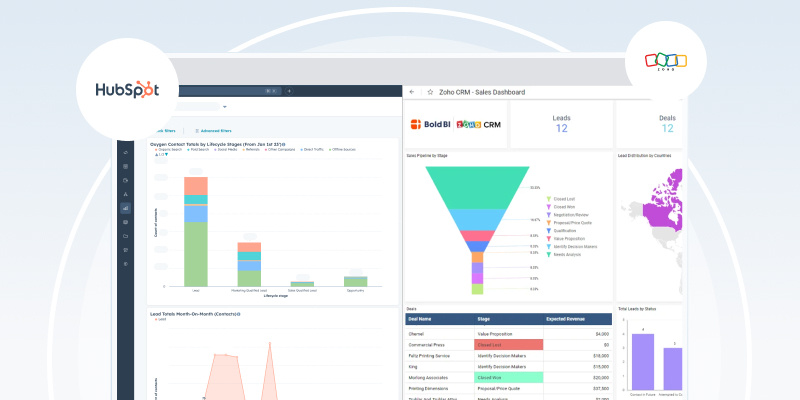

هل تبحث عن أفضل برنامج لإدارة علاقات العملاء (CRM) في دبي؟ من بين الخيارات العديدة المتاحة، يبرز كل من HubSpot وZoho كأحد أبرز المنافسين.
ورغم أن HubSpot غالبًا ما يكون أغلى من المنافسين مثل Zoho، إلا أنه يقدم تجربة متميزة مع دعم فني عالي الجودة.ويمكن لهذا الاستثمار أن يعزز كفاءة الفريق ورضا المستخدمين بشكل عام، مما يحسن معدلات اعتماد النظام وعائد الاستثمار.
ومع ذلك، فإن اختيار أفضل برنامج CRM يعتمد في النهاية على احتياجات عملك المحددة وميزانيتك وخطط النمو. قد تجد الشركات الصغيرة أو تلك التي لديها متطلبات أبسط أنخياراتZoho الأكثربأسعار معقولة مناسبة لها ، بينما تميل الشركات الأكبر حجمًا أو تلك التي تعطي الأولوية للميزات المتقدمة والدعم إلى اختيار HubSpot.
دعونا نتطرق إلى بعض الاختلافات الأساسية.
واجهة المستخدم ومعدل تبني النظام
HubSpot
تبدو واجهة HubSpot سهلة الاستخدام منذ أول تسجيل دخول. تتيح التصميمات البسيطة ووظيفة السحب والإفلات للموظفين الجدد بدء العمل بشكل منتج منذ اليوم الأول. تعتمد أتمتة سير العمل على أدوات إنشاء مرئية بدلاً من الاعتماد على معرفة البرمجة.
Zoho
تقدم Zoho إمكانيات تخصيص واسعة النطاق، وهو ما يجذب الشركات ذات المتطلبات المحددة. ومع ذلك، فإن هذه المرونة تصاحبها منحنى تعلم أكثر صعوبة. تفيد العديد من المؤسسات بأنها تحتاج إلى أسبوعين أو أكثر من التدريب قبل أن يتمكن الموظفون من التعامل مع النظام بثقة. تضع الواجهة العديد من الخيارات على شاشات واحدة، مما يسبب إرهاقًا معرفيًا للمستخدمين الجدد.
أتمتة المبيعات والتسويق
يجمع «Marketing Hub» من HubSpot بين الصفحات المقصودة وإدارة المدونات ووسائل التواصل الاجتماعي والإعلانات والتسويق عبر البريد الإلكتروني وأدوات تحسين محركات البحث (SEO) ضمن منصة واحدة. يتم استخلاص التخصيص مباشرةً من بيانات نظام إدارة علاقات العملاء (CRM). ويتم تحديث اختبارات A/B والتجزئة الديناميكية تلقائيًا بناءً على سلوك العملاء.
يتطلب Zoho استخدام Zoho Sites للمواقع الإلكترونية، وZoho Social لإدارة وسائل التواصل الاجتماعي، وZoho Campaigns للبريد الإلكتروني — أي ثلاثة اشتراكات منفصلة بثلاث واجهات مختلفة. ويُعد تخصيص البريد الإلكتروني أكثر صعوبة، وغالبًا ما تتطلب القوالب تعديلات كبيرة لضمان التوافق مع الأجهزة المحمولة.
4-ميزات-مجانية-لبرنامج-HubSpot-CRM-لتعزيز-المبيعات
تكامل خدمة العملاء
يتعامل Zoho Desk مع إدارة التذاكر بشكل ملائم ولكنه يعمل بشكل منفصل. لا يمكن لموظفي الدعم معرفة ما إذا كان العميل جديدًا أم حاليًا، أو الاطلاع على سجل مشترياته، أو تفاعلاته التسويقية، أو فرص المبيعات المفتوحة بسهولة دون فتح شاشات متعددة.
يقوم HubSpot Service Hub تلقائيًا بربط التذاكر بسجلات العملاء الكاملة. يرى موظفو الدعم المسار الكامل للعميل، بما في ذلك نقاط الاتصال التسويقية، والمحادثات المبيعية، والتفاعلات السابقة مع الدعم، مما يتيح استجابات أسرع وأكثر استنارة. تتكامل قواعد المعرفة مع موقعك الإلكتروني مع الحفاظ على تناسق العلامة التجارية.
التقارير والتحليلات
يوفر Zoho Analytics إمكانيات قوية، لكنه يتطلب استخراج البيانات من مصادر عديدة لإنشاء تقارير مفيدة. وكل تقرير جديد يعني تكرار نفس العملية: الاستخراج، والدمج، والتنقية، والتحليل.
تستمد تقارير HubSpot البيانات من أنظمة إدارة علاقات العملاء (CRM) والتسويق والمبيعات والخدمة في آن واحد، لأن كل شيء موجود في قاعدة بيانات واحدة. يتم تحديث لوحات المعلومات في الوقت الفعلي دون الحاجة إلى المزامنة اليدوية. توضح تقارير الإحالة بالضبط الحملات التي جذبت العملاء وعائد الاستثمار الحقيقي لها.
مقارنة الأسعار
تقدم كلتا المنصتين مستويات مجانية. توفر HubSpot عددًا غير محدود من المستخدمين وجهات الاتصال مجانًا، بينما تحدد Zoho الحسابات المجانية بثلاثة مستخدمين.
فيما يلي جدول يوضح نموذج التسعير لكل من HubSpot وZoho CRM:
|
الخطة |
أسعار HubSpot (درهم إماراتي/شهر) |
أسعار Zoho CRM (درهم إماراتي/شهر) |
|
الخطة المجانية |
0 درهم إماراتي (عدد غير محدود من المستخدمين) |
0 درهم إماراتي (حتى 3 مستخدمين) |
|
الأساسي/المبتدئ |
92 درهم إماراتي لكل مستخدم (ما يصل إلى مستخدمين) |
84 درهم إماراتي (لكل مستخدم) |
|
المحترف |
1,500 درهم إماراتي لكل مستخدم (حتى 5 مستخدمين) |
135 درهم إماراتي (لكل مستخدم) |
|
المؤسسات |
2020 درهم إماراتي لكل مستخدم (حتى 10 مستخدمين) |
225 درهم إماراتي (لكل مستخدم) |
عادةً ما يؤدي السعر الأعلى لـ HubSpot إلى انخفاض التكلفة الإجمالية للملكية. فالنهج الشامل يزيل نفقات التكامل مع الأطراف الثالثة، ويقلل من وقت التدريب، ويحد من التعقيد الذي يؤدي إلى ارتفاع التكاليف التشغيلية. غالبًا ما ترتفع أسعار Zoho الجذابة للمبتدئين مع قيام الشركات بإضافة وحدات للدعم والتحليلات وإدارة المشاريع.
دعم العملاء
HubSpot
توفر HubSpot دعمًا عبر الهاتف والدردشة على مدار الساعة طوال أيام الأسبوع لمستخدمي الإصدارين Professional وEnterprise، مدعومًا بوثائق شاملة ودورات شهادة مجانية من HubSpot Academy. وتُثبت منظومة الدعم هذه قيمتها بشكل خاص للشركات في الإمارات العربية المتحدة التي تحتاج إلى مساعدة سريعة الاستجابة.
Zoho
تقدم Zoho الدعم على مدار الساعة طوال أيام الأسبوع فقط في الباقات الأعلى مستوى، مع خيارات محدودة أكثر في الباقات الأقل سعرًا. جودة الدعم كافية، لكنها تفتقر عمومًا إلى العمق والتوافر اللذين توفرهما HubSpot.
قدرات التكامل
يوفر سوق التطبيقات (App Marketplace) التابع لـ HubSpot أكثر من 1,000 تكامل أصلي مع تطبيقات الجهات الخارجية، مما يجعل من السهل ربط أدوات العمل الحالية. بالنسبة للأنظمة الخارجية مثل تخطيط موارد المؤسسات (ERP) أو إدارة المخزون، يوفر HubSpot Operations Hub ميزة المزامنة التلقائية.
يتكامل Zoho جيدًا داخل نظامه البيئي الخاص، مثل Zoho Books وZoho Desk وZoho Projects، لكن ربط الأدوات الخارجية غالبًا ما يتطلب مجهودًا تقنيًا أكبر. هذا التركيز الداخلي يفيد الشركات الملتزمة بالفعل بمجموعة Zoho، لكنه يحد من المرونة بالنسبة لأولئك الذين يستخدمون برامج متنوعة.
3 حالات استخدام عالية القيمة لدمج WhatsApp وHubSpot
ما هي المنصة التي تناسب شركتك؟
يُعد HubSpot مثاليًّا لـ:
- شركات B2B ذات دورات مبيعات متوسطة إلى معقدة
- فرق التسويق التي تتطلب تكاملاً وثيقًا بين القنوات
- شركات الخدمات التي تحتاج إلى نظام CRM موحد وشفافية في الدعم
- المؤسسات التي تعطي الأولوية للتبني السريع والتدريب المحدود
- الشركات التي تخطط لتحقيق نمو كبير دون إجراء تغييرات على الأنظمة
فكر في Zoho إذا:
- كانت قيود الميزانية هي الشاغل الرئيسي
- كنت بحاجة إلى تخصيص واسع النطاق ولديك الموارد التقنية
- كانت احتياجاتك بسيطة مع متطلبات تكامل محدودة
ملخص المقارنة
|
العامل |
HubSpot |
Zoho |
|
الجمهور المستهدف |
الشركات التي تبحث عن منصة متكاملة وسهلة الاستخدام مع أتمتة تسويقية قوية. |
تضع الشركات الفعالية من حيث التكلفة في مقدمة أولوياتها وتحتاج إلى تخصيص واسع النطاق. |
|
المزايا |
- أدوات شاملة - سهولة الاستخدام - تكلفة إجمالية للملكية مواتية على المدى الطويل - دعم فني ممتاز |
- هيكل تسعير مرن - جاذبية للشركات الصغيرة والمتوسطة - تكلفة أولية أقل |
|
اعتبارات التكلفة |
قد يؤدي ارتفاع الأسعار، خاصة مع الميزات المتقدمة، إلى انخفاض التكلفة الإجمالية للملكية (TCO) بسبب تقليل الاعتماد على أدوات الجهات الخارجية وانخفاض تكاليف التدريب. |
تكلفة أولية أقل، لكن التكلفة الإجمالية للملكية (TCO) قد ترتفع مع النمو بسبب زيادة عمليات التكامل والدعم. |
مقدمة إلى إدارة علاقات العملاء (CRM) والتكلفة الإجمالية للملكية (TCO)