
 International
.png?length=800&name=3%20(1).png)
Building a website in Arabic takes more than translation. Arabic website localisation covers layout, search, typography and cultural fit, and getting any one of them wrong is what makes a site feel translated rather than built. Here are the key tips for designing Arabic websites, backed by insights and statistics, to help you succeed in this region.
What Is an RTL Layout?
RTL (Right-to-Left) design caters to languages like Arabic and Urdu, which are written and read from right to left. These languages are spoken across the Middle East and North Africa, including Egypt, Saudi Arabia, Iraq and Syria, and they carry unique design requirements. RTL design adjusts a website’s user interface, layout, and design elements to align with the natural reading direction of these languages.
While an Arabic website may appear as a mirrored version of its English counterpart, ensuring proper display demands considerable effort, including precise alignment of text, images, and navigation elements. Many platforms, including HubSpot, offer built-in RTL support, simplifying the process of adapting layouts and styles. A McKinsey study found that trust in digital platforms alone doesn’t guarantee user satisfaction. Ease of use and cultural alignment matter just as much. An RTL layout keeps your website accessible, culturally relevant and easy to use.
HubSpot offers practical solutions for handling RTL layouts:
- Multi-language Content: HubSpot allows users to translate content into multiple languages, including RTL languages like Arabic.
- Language Switcher: Adding a language switcher module to the page’s template enables visitors to choose their preferred language.
- RTL Formatting Support: If Arabic is selected as the language, the content editor automatically uses RTL formatting.
RTL designed website powered by HubSpot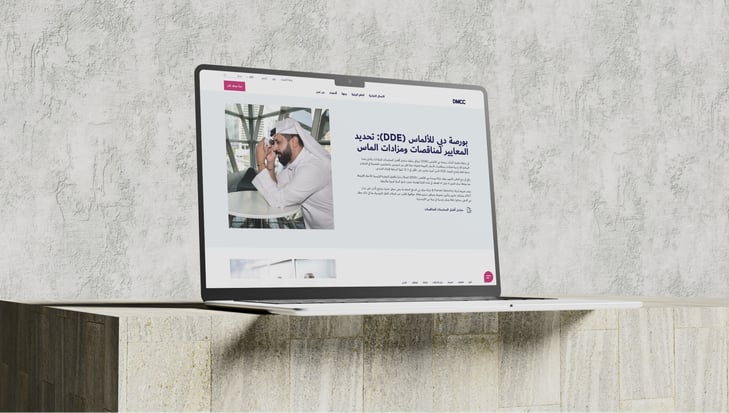
Platforms with built-in multilingual support like HubSpot simplify the design process and keep your visuals RTL-compliant. Get text alignment, image placement and navigation right, and the result is a site that reads as though it was built in Arabic. This is where working with an experienced website design and development team pays off, as RTL issues are far cheaper to prevent than to retrofit.
Pro Tip: Always test your RTL design thoroughly on multiple devices to ensure consistency and usability.
How Does Arabic SEO Differ from English SEO?
The Middle East has some of the highest internet penetration rates in the world, with the UAE and Qatar reaching 100% and 99% respectively. With an audience that size, optimising your website for Arabic search engines is essential, and it is one of the shifts we cover in the future of digital marketing in the UAE. Effective SEO for Arabic websites goes beyond standard SEO practice. It needs tools and techniques built for Arabic keyword research and rankings.
Ahrefs for Arabic Keywords
Ahrefs can be a powerful tool for researching Arabic keywords. You can track competitors, find high-performing keywords, and optimise content accordingly. It also allows you to conduct keyword research specific to Arabic-speaking countries. This feature enables you to discover which keywords your competitors are targeting in different Arabic regions and optimise your site for the keywords that matter most in these markets.
Arabic Keywords on Ahrefs
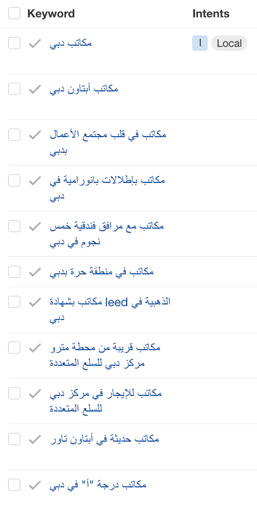
Conducting Keyword Research on Ahrefs in Arabic:
- Step 1: Open Keyword Explorer and set your country
Log into Ahrefs and open the Keyword Explorer tool. Set the target country before you search anything, because search volumes for the same Arabic term vary widely between the UAE, Saudi Arabia and Egypt. Searching the region as a whole will flatten those differences and hide your real opportunity. - Step 2: Enter your seed keyword in Arabic
Type the term the way a customer would type it, not the way it appears in a brochure. Arabic can be written with or without short vowel marks, and people almost always search without them, so use the undiacritised form as your seed. - Step 3: Test dialect against Modern Standard Arabic
Formal content is usually written in Modern Standard Arabic, but people frequently search in dialect. Run both versions of your seed keyword through Keyword Explorer, since Gulf and Egyptian phrasing for the same product can behave as completely different keywords. - Step 4: Review the keyword ideas
Ahrefs will generate a list of related keyword ideas along with search volume, keyword difficulty and competition. Include transliterated and English variants in your review, because many UAE users search in English even when they prefer to read Arabic content. - Step 5: Analyse the metrics
High search volume indicates demand, while low keyword difficulty means a better chance of ranking. Arabic terms often carry noticeably lower difficulty than their English equivalents, so a modest volume can still be worth targeting. - Step 6: Use filters
Filter by search volume, difficulty and relevance to focus on the keywords that align with your strategy and goals rather than the whole list. - Step 7: Analyse the SERPs
Click through to see the search results for a keyword. Check whether the top-ranking pages come back in Arabic or English, because that answers which language to publish in faster than any metric will. Study the formats that rank, including featured snippets, to understand what the page needs to look like. - Step 8: Explore competitor keyword rankings
Look at which terms your competitors hold that you do not. Your Arabic search competitors are often regional players rather than the global brands you compete with in English. - Step 9: Create your keyword list
Group your findings into themed lists that map to pages you intend to build. Grouping properly also helps you avoid keyword cannibalisation, where several pages compete for the same Arabic term.
Actionable Tip: Use a combination of short and long-tail Arabic keywords, and make sure to optimise your meta descriptions, alt text, and URL structures for Arabic search terms.
Should Your Arabic Website Use a .ae or .com Domain?
Choosing the right domain extension can impact your website’s visibility and credibility. A .ae domain is ideal for businesses focused on the UAE market, signalling local relevance and building trust with regional audiences. Conversely, a .com domain offers international appeal, making it the preferred choice for companies with a broader, global reach. Understanding the distinction between these two options will help you make a more informed choice that aligns with your business goals and growth aspirations.
The Role of a .AE Domain for UAE-Focused Websites
By opting for a .ae domain, you’re also signalling to your visitors that your business is based in the UAE, which adds an extra layer of credibility. Local consumers tend to trust websites with regional domains as they feel more relevant and tailored to their specific needs. It creates a sense of connection and reliability, which matters when you are building long-term trust.
Why .com Might Not Be Enough for UAE-Focused Businesses
While a .com domain has global recognition and is ideal for international businesses, it doesn’t always provide the same SEO and local engagement advantages as a .ae domain when targeting UAE customers. A .com extension may not rank as high in local searches, meaning your website might be less visible to potential customers in the UAE compared to competitors using a .ae domain.
Combining a .AE Domain with Localised Arabic Content
To get the most from a .ae domain, pair it with content built for your target audience. Simply registering a .ae domain won’t guarantee success. Your website should feature localised Arabic content that caters to the cultural preferences and expectations of UAE users. This means using Arabic, highlighting local customs, and addressing region-specific needs and interests.
Which Fonts Work Best for Arabic Websites?
Typography does much of the work in delivering a good user experience, especially on Arabic websites. Proper Arabic typesetting affects readability, visual appeal and accessibility. Here’s what to keep in mind:
- Font Selection: Use web-safe Arabic fonts such as Noto Sans Arabic, Cairo, Tajawal, or Markazi Text, which are available through Google Fonts. These fonts are optimised for digital readability and maintain a professional look across devices. For bilingual sites, pairing Arabic fonts like Noto Sans Arabic or Cairo with English fonts offers a good fit, ensuring readability for both languages.
- Font Size: The recommended base font size for Arabic text on websites is between 18-20px for body text to ensure better readability. Arabic text generally requires a slightly larger font size than English text for optimal legibility.
How Does Translation Affect Your Arabic Layout?
When translating from English to Arabic, it’s important to plan for changes in text length. Arabic often uses fewer words than English to express the same idea, so word counts can drop. The rendered text, however, frequently takes up more space rather than less, because Arabic characters extend above and below the baseline and need a larger font size to stay legible.
Handling Text Length: The practical result is that an English layout rarely holds as it is. Fixed-height containers can overflow, buttons and menu items resize unpredictably, and short strings shift the most, since a two-word English label can become a single Arabic word that cannot break across lines. Experienced Arabic language web designers and content creators are aware of this and will adjust the layout and design as needed to maintain a balanced, professional appearance.
Pro Tip: Ensure adequate line height and spacing to avoid a cluttered appearance, improving readability and user experience.
What Makes an Arabic Website Future-Ready?
A successful Arabic website takes more than translation. Arabic website localisation works when cultural relevance, design and search all point the same way. Adopt an RTL layout, optimise for Arabic SEO, choose the domain that matches your market and give Arabic type the space it needs, and you end up with a site that Arabic-speaking audiences can actually use.